 Wow InvoiceWow Invoice
A real example for building and renovation jobs — labour, materials by the bag and block, delivery and clean-up. Download it free, or make your own on your phone and get paid by card.
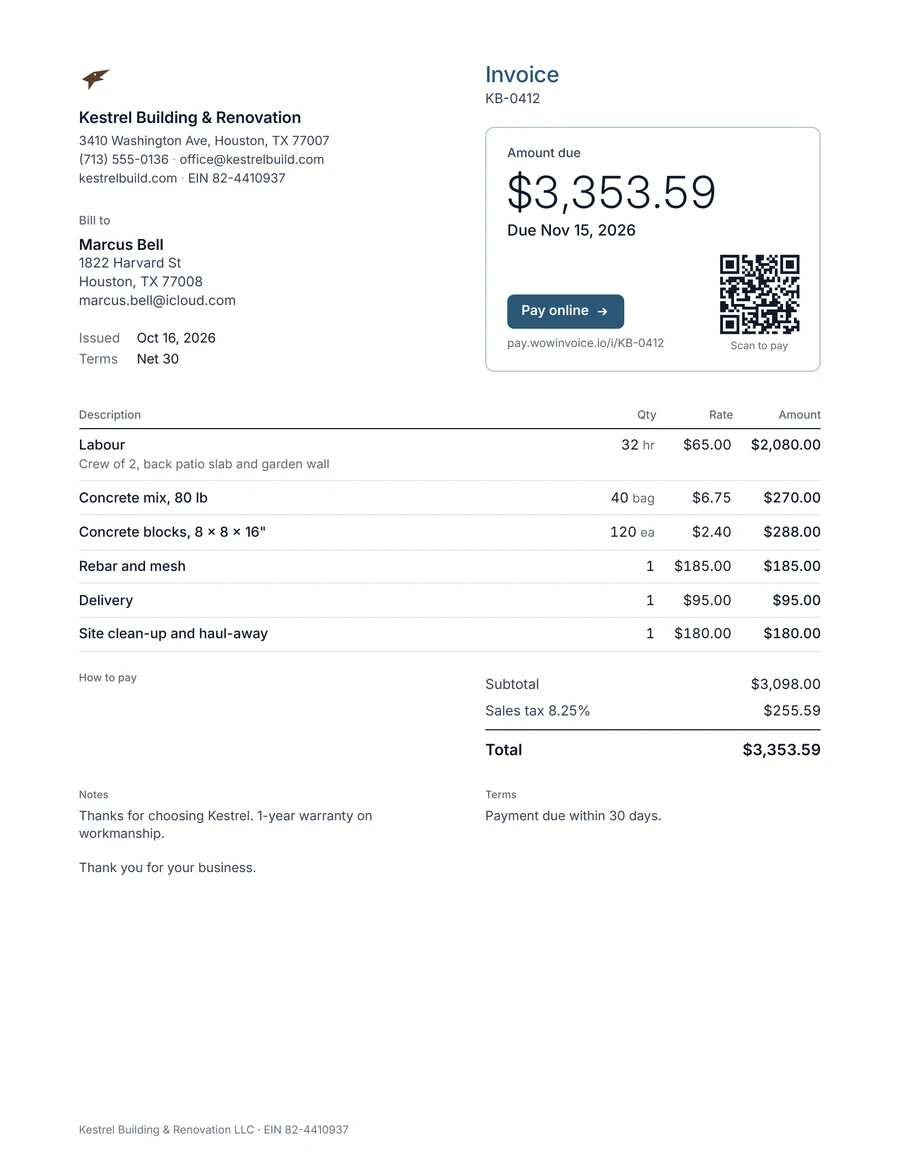
The lines builders and renovators add most often in Wow Invoice. Save them once and they’re there for the next job.
| Line item | Unit | Tip |
|---|---|---|
| Labour | hour | Note the crew size |
| Materials | item | Lumber, drywall, fixings |
| Cement or concrete mix | bag | |
| Bricks or blocks | each | |
| Transport and delivery | job | |
| Site clean-up | job | Including haul-away |
Send an estimate, take a deposit, then invoice at each stage so the money comes in as the work does.
A line for every material builds trust and makes changes easy to price.
Send the stage invoice from the site; clients can pay by card from the link.
Wow Invoice turns this template into a 1-minute invoice: pick the design, add your logo, tap your saved items, and send it by text or email. Your client opens it in any browser and pays by card, Apple Pay or Google Pay.


Send an estimate first. When the client accepts, invoice the deposit, then invoice each stage; record what’s been paid so the last invoice shows only the balance.
Yes. Download the PDF example for free. The Wow Invoice app is free to download too, and makes the same kind of invoice on your phone.
Yes. Wow Invoice takes card payments through Stripe, so your client can pay by credit card, Apple Pay or Google Pay straight from the invoice link.
Yes. Send an estimate, and turn it into an invoice with one tap when the client says yes.