 Wow InvoiceWow Invoice
A real example for shops and online sellers — products with sizes and quantities, a delivery fee, tax and how to pay. Download it free, or make your own on your phone and get paid by card.
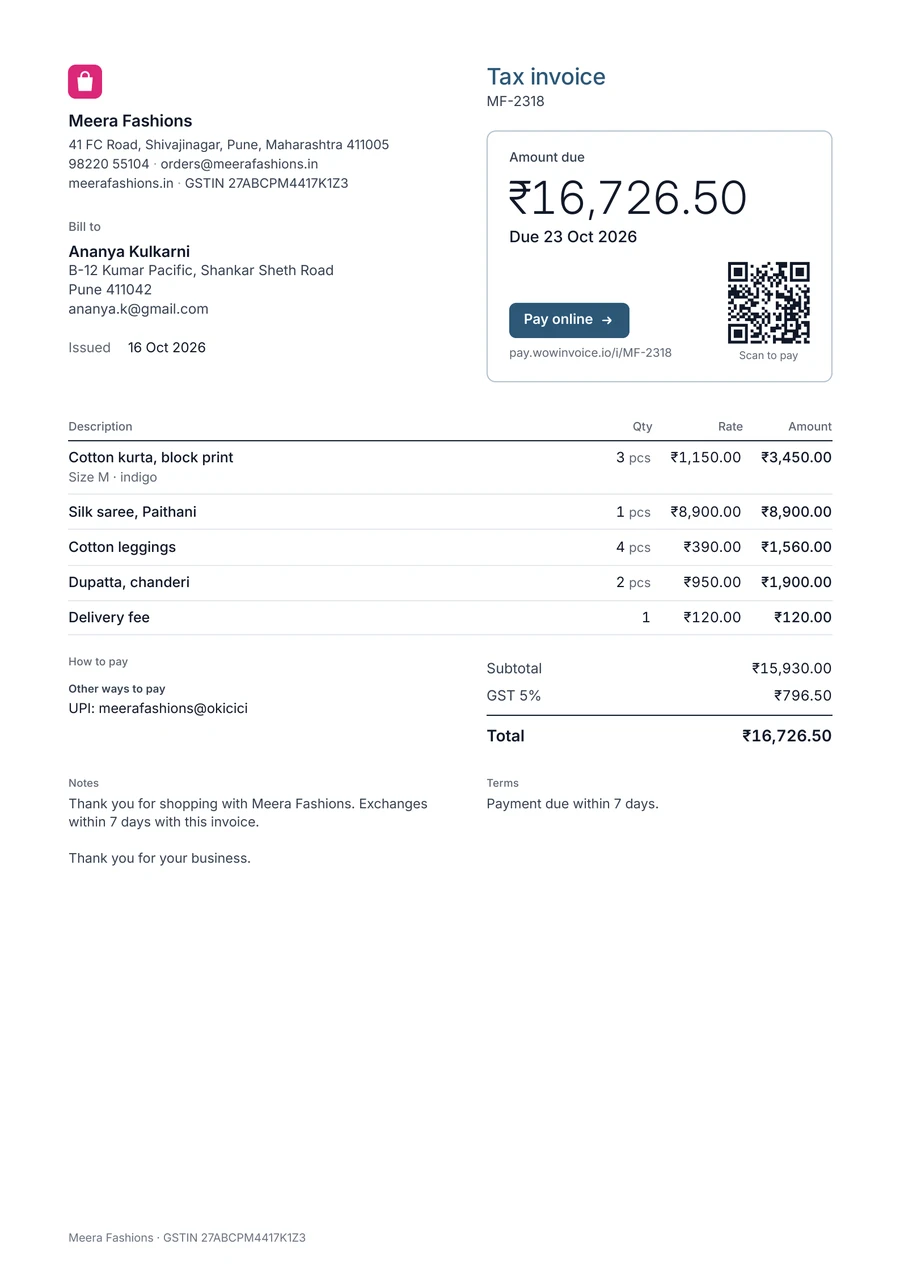
Small sellers mostly invoice their own products. Add them once in Wow Invoice and pick them for every order.
| Line item | Unit | Tip |
|---|---|---|
| Your products | each | With size, colour or variant |
| Delivery fee | order | The most common extra line for sellers |
| Discount | order | A % or an amount |
| Gift wrapping | order | If you offer it |
With your products saved, an invoice is a few taps: pick, set the quantity, send.
Customers expect to see delivery separately from the products.
Send the invoice with the order; customers can pay by card from the link.
Wow Invoice turns this template into a 1-minute invoice: pick the design, add your logo, tap your saved products, and send it by text or email. Your customer opens it in any browser and pays by card, Apple Pay or Google Pay.


Yes. Add each product once with its price in Wow Invoice, then pick it from your list on every invoice.
Yes. Download the PDF example for free. The Wow Invoice app is free to download too, and makes the same kind of invoice on your phone.
Yes. Wow Invoice takes card payments through Stripe, so your client can pay by credit card, Apple Pay or Google Pay straight from the invoice link.
Yes. Send an estimate, and turn it into an invoice with one tap when the client says yes.